Claude Skills: What I Kept, What I Dropped, and What Actually Helped My Build
Written by Adam Bair. Published 2026-04-30. AI Workflows
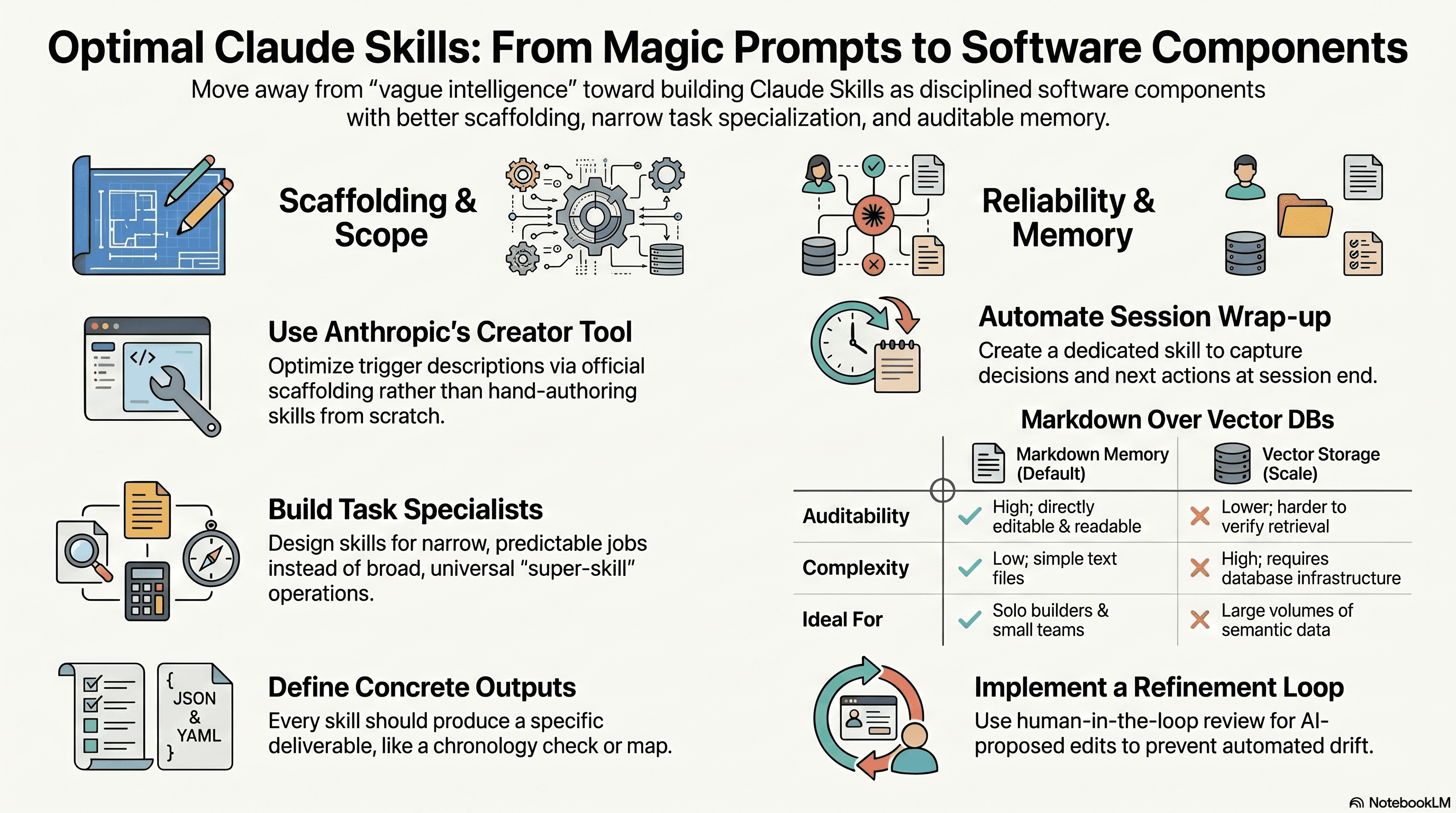
Claude Skills are useful, but not for the reasons most people claim. I tested a popular methodology for building more capable Claude Skills while working on an AI tool I am building for cross-examination. Some of it helped immediately. Some of it was branding. Some of it was just ordinary software discipline dressed up as a new system.
This is my field report. I am a working trial lawyer. I run a small AI team that handles the business side of my practice while I keep practicing law, and this article is one report from that work. I am not trying to sell a framework. I wanted to know whether this way of building Claude Skills would improve reliability, memory, and output quality in a real product build. Two ideas were worth keeping. Several were not.
The two ideas I kept were simple:
- Use Anthropic's skill creation tooling to scaffold new Claude Skills. I had been hand-writing skills. That was a mistake, especially around trigger descriptions.
- Turn session wrap-up into its own Claude Skill. Memory works better when the system captures it consistently, instead of relying on me to remember to do it.
The rest needs more caution. Claims about “self-improving AI” are often overstated. Vector databases are not the default answer for solo builders. And a lot of what gets packaged as a special system is just a session log, a knowledge base, and a current-state file.
Table of Contents
- Step 1: Start with the actual problem Claude Skills need to solve
- Step 2: Use Anthropic's skill creator instead of hand-authoring Claude Skills
- Step 3: Treat Claude Skills as task specialists, not universal operators
- Step 4: Keep the memory system simple unless you truly need more
- Step 5: Turn wrap-up into its own Claude Skill
- Step 6: Be honest about what “self-improving” Claude Skills really means
- Step 7: Do not over-credit the Karpathy principles
- Step 8: Build Claude Skills around concrete outputs, not vague intelligence
- Step 9: Use connectors only when the skill truly needs outside data
- Step 10: What I would tell anyone building Claude Skills today
- Step 11: The mistakes I would avoid if I were starting over
- Step 12: The bottom line on Claude Skills after testing this method
- FAQ
Step 1: Start with the actual problem Claude Skills need to solve
Most Claude Skills fail for boring reasons. They are vague. They trigger at the wrong time. They lack context. They do not preserve the parts of prior work that matter. And they are not evaluated after use.
That was true in my own build. I am writing Claude Skills to teach the cross-exam bot I am building specific techniques. Those skills are not generic writing prompts. They need to do narrow work well. They need to recognize when they should run. They need access to the right source material. They need to behave predictably.
That matters more than any branding around “super skills.” If a Claude Skill cannot reliably:
- trigger under the right conditions,
- use the right instructions,
- pull the right context, and
- preserve useful learning from the last session,
then it is just a dressed-up markdown file.
Step 2: Use Anthropic's skill creator instead of hand-authoring Claude Skills
This was the clearest improvement I found.
I had been writing Claude Skills by hand. That felt efficient. It was not. The failure point was usually the same: the trigger description. A skill can have decent instructions and still fail if Claude does not know when to invoke it, or invokes it too broadly.
The better approach is to scaffold Claude Skills using Anthropic's own skill creation flow. The practical reason is not mystique. It is optimization. The tooling is better at shaping the skill description and clarifying what the skill is supposed to do.
When I switched to that method, I got fewer ambiguous triggers and cleaner boundaries between skills.
What I now include when creating Claude Skills
- Intended outcome. What exact output should this skill produce?
- Use case boundaries. When should it run, and when should it not run?
- Input expectations. What material does the skill need to work well?
- Output format. What shape should the answer take?
- Clarifying questions. What should Claude ask before proceeding if the input is incomplete?
For my own Claude Skills, this made the difference between “help with cross-examination” and something narrower and usable, such as identifying impeachment opportunities, surfacing inconsistent chronology, or drafting a line of questioning under a defined theory.
That is a better way to think about Claude Skills in general. Narrow scope beats broad ambition.
Step 3: Treat Claude Skills as task specialists, not universal operators
I found it useful to separate Claude Skills into two rough classes.
Utility Claude Skills
These do one simple thing. They are low-risk and easy to verify. A formatting skill is a good example. A conversion skill is another. If it fails, the damage is limited.
High-context Claude Skills
These depend on strategy, domain context, stored knowledge, or current project state. This is where most of the interesting work lives. It is also where poor design causes drift.
The cross-exam bot I am building depends mostly on the second type. A generic skill is not enough. It needs to know the current objective, the source material I trust, and the exact output constraints.
That is why I do not think the useful distinction is “basic skills” versus “super skills.” The useful distinction is simple task automation versus context-sensitive work.
Step 4: Keep the memory system simple unless you truly need more
This is where I parted ways with a lot of the framework language.
I do think Claude Skills benefit from structured memory. I do not think most solo builders need to start with a vector database. For many builds, that adds complexity before it adds value.
The memory model I actually kept is simpler:
- Session log. A record of important prior conversations and outputs.
- Knowledge base. Stable reference material that does not change often.
- Current-state file. A short, editable description of what the system is working on now.
That is not a novel taxonomy. It is just a practical one.
In my testing, markdown plus good Claude Skills descriptions gave me something I care about more than novelty: deterministic and auditable retrieval. I can inspect what the system saw. I can edit it directly. I can tell why a result happened.
That matters a lot when I am building something for cross-examination. I do not want memory to feel mystical. I want it inspectable.
When markdown memory is enough
- You are a solo builder or small team.
- Your knowledge base is modest.
- You want retrieval you can read and verify.
- You are working with structured notes, research, or internal process docs.
When vector storage may actually make sense
- You have large volumes of text.
- You need semantic search across many documents.
- You are handling scale where manual file organization stops being practical.
- You accept lower auditability in exchange for broader retrieval.
Vector storage is a real tool. I am not dismissing it. I am saying it should not be the default answer to Claude Skills memory.
Step 5: Turn wrap-up into its own Claude Skill
This was the second idea I kept without hesitation.
Manual journaling is fragile. End-of-session notes sound sensible until the day gets busy. Then they disappear. If memory depends on my discipline, it will eventually fail.
So I formalized wrap-up as its own Claude Skill.
The purpose is straightforward. At the end of a meaningful working session, the skill captures:
- what changed,
- what decisions were made,
- what remains unresolved,
- what should carry forward into the next session.
This is the most practical memory improvement I tested. It did not require a new architecture. It required consistency, and consistency came from giving the job to a tool.
What my wrap-up Claude Skill needs to produce
- Decision log. What choices were made and why.
- Open issues. What still needs resolution.
- Next actions. What should happen first in the next session.
- State updates. What should be added to the current-state file.
- Reference links or file pointers. Where the supporting material lives.
That turns “memory” into something plain. It is just retained work product.
Step 6: Be honest about what “self-improving” Claude Skills really means
I rejected the magical version of this idea.
Claude Skills do not become wise on their own. What actually helps is much simpler: the AI can run evaluations, surface weak spots, propose edits, and then a human decides whether to accept them.
That is useful. It is not self-improvement in the strong sense.
In my own testing, the safe pattern looked like this:
- I run the Claude Skill on a real task.
- I review the output against a defined standard.
- The system identifies where it missed the mark.
- It proposes instruction edits or trigger refinements.
- I approve, reject, or revise those changes.
That is a refinement loop. It works. But the human review step is doing real work. If you skip that step, you are not building better Claude Skills. You are automating drift.
What I evaluate in Claude Skills after each run
- Trigger accuracy. Did the right skill run?
- Scope control. Did it stay inside its job?
- Use of context. Did it rely on the correct materials?
- Output shape. Was the result in the expected form?
- Failure mode. If it failed, how exactly did it fail?
If a Claude Skill cannot be evaluated against concrete criteria, it is too vague.
Step 7: Do not over-credit the Karpathy principles
I also think this part needs plain speech.
The four principles often attached to this style of work are:
- think before coding,
- keep it simple,
- make surgical changes,
- pursue goal-driven execution.
I do not object to any of them. I use all of them. But three are ordinary discipline that any competent builder already tries to follow. The fourth is so broad it barely narrows anything.
That does not make them useless. It just means I do not treat them as the engine of better Claude Skills.
The engine is more concrete:
- better skill definitions,
- better trigger descriptions,
- better context retrieval,
- better wrap-up,
- better evaluation.
That is where I saw results.
Step 8: Build Claude Skills around concrete outputs, not vague intelligence
The most reliable Claude Skills I tested all had one thing in common. They were tied to an explicit output.
A weak skill asks for “better analysis.” A stronger skill asks for one specific deliverable with clear criteria.
In my own work, that means a Claude Skill should know whether it is supposed to produce:
- a chronology check,
- a contradiction map,
- a theory-of-impeachment outline,
- a targeted line of questioning,
- or a session wrap-up.
This is the easiest way I know to make Claude Skills more dependable. Give each skill a job that can be checked. The same patterns show up in the courses I am building, including a course on visual presentation for trial lawyers I am revising right now. When the deliverable is concrete, the work gets sharper. When the deliverable is vague, nothing helps.
Step 9: Use connectors only when the skill truly needs outside data
Another useful lesson was narrower than the marketing around it. External connectors can matter. But not every Claude Skill needs them.
I now ask one question first: does this skill need live external data to do its job?
If the answer is no, I keep it local. Fewer moving parts. Fewer failure points.
If the answer is yes, then I define the source before I define the workflow. That means identifying the primary source of truth first, and only then deciding how Claude should access it.
That sequence matters. If the source is weak, no connector fixes the problem.
A practical hierarchy for external data in Claude Skills
- Native connector if available. Simplest option.
- Custom connector for a specific service. Useful when direct support is missing.
- Automation bridge such as Zapier. Helpful for broader tool access.
I still resist connecting everything just because I can. Claude Skills get harder to reason about as dependencies multiply.
Step 10: What I would tell anyone building Claude Skills today
If I had to reduce this to a working checklist, it would be this:
- Use Anthropic's skill creation tooling. Especially for trigger descriptions.
- Define narrow jobs. One skill, one task shape.
- Keep memory inspectable. Session log, knowledge base, current-state file.
- Automate wrap-up. Do not trust habit.
- Evaluate every important run. Claude Skills improve through review, not wishful thinking.
- Add vector retrieval only when scale justifies it.
- Ignore pricing theater. Good Claude Skills are measured by reliability, not slogans.
Step 11: The mistakes I would avoid if I were starting over
- Hand-writing every skill from scratch. I lost time here.
- Making skills too broad. Broad skills become unpredictable skills.
- Relying on memory without a formal wrap-up process.
- Using vector storage before proving I needed it.
- Calling a skill “self-improving” when no human review exists.
- Treating common engineering discipline as a new theory.
Step 12: The bottom line on Claude Skills after testing this method
My conclusion is simple. Claude Skills get better when I treat them like software components, not magic prompts.
I kept two ideas because they made the build more reliable: Anthropic's skill creator for scaffolding, and a dedicated wrap-up skill for memory capture. I dropped the inflated claims, the default push toward vector databases, and the suggestion that ordinary engineering habits amount to a special doctrine.
For the cross-exam bot I am building, that was enough to matter. The Claude Skills became easier to define, easier to inspect, and easier to improve.
If you are building Claude Skills for real work, that is the threshold I would use. Not whether the framework sounds impressive. Whether the skill does its job, with context you can verify, and a refinement loop you can trust.
This piece is informed by a popular Claude Skills video that has been circulating on YouTube and the broader Karpathy materials it draws on. I tested its claims against my own product build before writing.
FAQ
Are Claude Skills worth using for serious work?
Yes, if the Claude Skills are narrowly defined, tied to clear outputs, and supported by good context. They are less useful when they are broad, generic, or poorly triggered.
What is the most important part of building Claude Skills?
The trigger description is one of the most failure-prone parts. A skill can be well-written and still perform badly if Claude does not know when to use it. That is why I now use Anthropic's skill creation tooling instead of hand-authoring every skill.
Do Claude Skills need a vector database for memory?
No. Many solo builds work well with markdown files, a session log, a stable knowledge base, and a current-state file. Vector storage becomes more useful when document volume and retrieval complexity justify it.
Can Claude Skills really self-improve?
Not in the magical sense. What works is a review loop where the AI runs evaluations, identifies failures, suggests edits, and a human approves or rejects those edits. That is refinement, not autonomous wisdom.
What kind of memory system works best with Claude Skills?
I prefer a simple structure: a session log for prior work, a knowledge base for stable references, and a current-state file for active goals and decisions. It is easier to audit and easier to maintain.
Should every Claude Skill have access to connectors and external data?
No. I only add connectors when the skill actually needs live outside data. Every extra dependency makes the skill harder to debug and easier to break.
Where can I verify the underlying tools and concepts for Claude Skills?
The best starting points are primary sources, especially Anthropic's documentation for Claude and Claude Skills, Anthropic's guidance on tool use and prompting, and the original public materials associated with the Karpathy coding principles that circulated through GitHub.
Written by Adam Bair.
Adam Bair is a Florida trial lawyer and AI educator. He writes about verification-first AI workflows for legal practice. Florida Bar profile.